
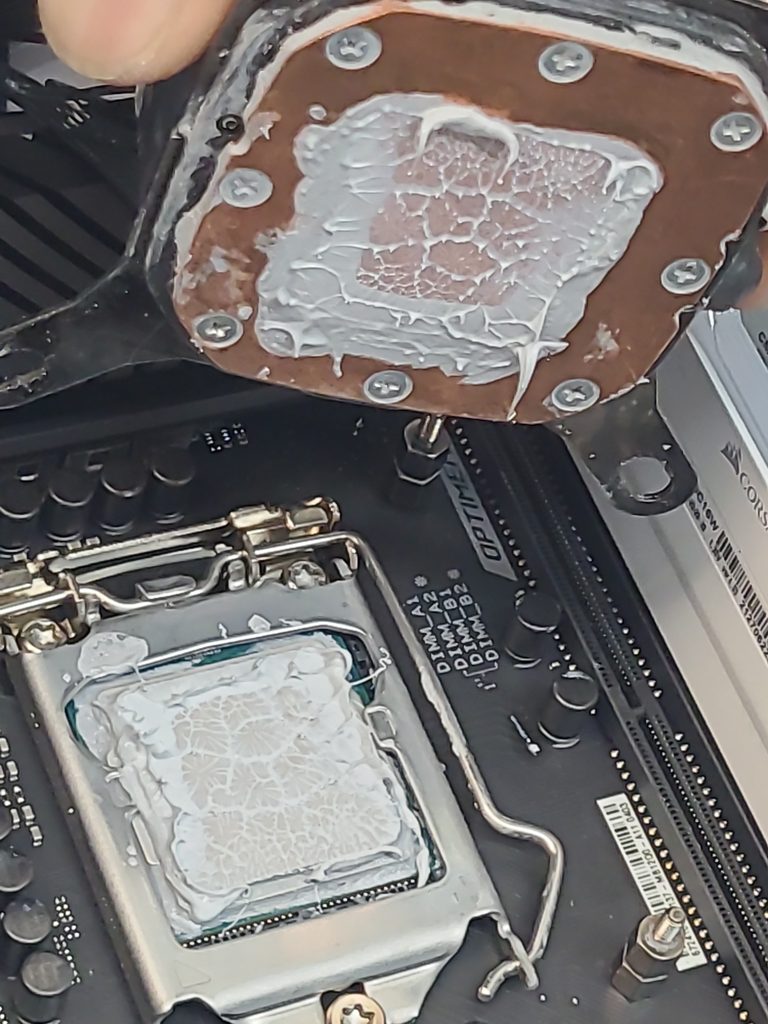
Thermal paste is designed to sit quietly between a CPU and its heatsink—nowhere else. But when there is a thermal paste spill on motherboard, inside power connectors, or packed into the CPU socket, it becomes one of the most destructive accidents a computer can experience.
This isn’t just a messy cleanup. A widespread thermal paste spill can cause short circuits, power delivery failures, corrosion, overheating, and permanent motherboard damage.
This post explains exactly what happens when thermal paste spreads where it shouldn’t, how it affects each component, and what steps can (and cannot) save the system.
How a Thermal Paste Spill on Motherboard Causes Damage
Not all thermal pastes are the same. Some are non‑conductive, while others—especially metal‑based pastes like Arctic Silver—are electrically conductive or capacitive.
When paste spreads across the board, it can:
- Bridge tiny electrical contacts
- Block power delivery
- Trap heat
- Attract dust and moisture
- Create long‑term corrosion
Even “safe” ceramic pastes can cause failures when they physically block pins or prevent proper electrical contact.
1. Thermal Paste Spill on Motherboard: What Really Happens
This is the worst‑case scenario.
The CPU socket contains hundreds to thousands of microscopic pins responsible for power, memory channels, PCIe lanes, and CPU communication. When paste gets inside:
- Pins become insulated, preventing proper contact
- Conductive paste can short pins together, killing the CPU or motherboard
- Capacitive paste can distort signals, causing random crashes
- Moisture in the paste accelerates corrosion
Symptoms include:
- No POST
- Fans spin but no display
- Intermittent booting
- Memory channel failures
- Burn marks under the CPU
Once paste enters the socket, the motherboard is often unrecoverable.
2. Thermal Paste on Power Connectors (ATX 24‑pin, CPU 8‑pin, GPU power)
Power connectors are designed for a tight, clean metal‑to‑metal connection. Paste inside these connectors causes:
- High resistance, leading to overheating
- Arcing, which can burn the plastic housing
- Voltage drops, causing random shutdowns
- Complete failure to power on
Conductive paste can short adjacent pins, instantly damaging:
- The motherboard
- The PSU
- The CPU VRM circuitry
Even non‑conductive paste can physically block the connection and cause intermittent power loss.
3. Thermal Paste Spread Across the Motherboard
When paste coats the board surface, it can affect:
Power delivery circuits
VRMs and MOSFETs run hot. Paste traps heat and can cause:
- VRM overheating
- Throttling
- Sudden shutdowns
- Permanent VRM failure
Capacitors and resistors
Paste can bridge components or insulate them, causing:
- Incorrect voltage readings
- Sensor failures
- Fan control issues
- Random freezes
PCIe and RAM slots
Paste inside slots prevents proper contact and can cause:
- RAM not detected
- GPU not detected
- System instability
4. Long‑Term Effects: Corrosion & Residue Damage
Thermal paste contains oils and compounds that:
- Attract dust
- Absorb moisture
- Break down metal contacts over time
Even after cleaning, residue can remain under chips or inside connectors, causing failures weeks or months later.
Can a Computer Survive a Thermal Paste Spill?
It depends on where the paste went.
Likely survivable
- Paste on the motherboard surface
- Paste on the heatsink
- Paste on the CPU heat spreader
- Paste on removable components (RAM, GPU)
Often fatal
- Paste inside the CPU socket
- Paste inside power connectors
- Paste inside PCIe or RAM slots
- Paste bridging VRM components
Once paste enters internal pin cavities, the board is usually beyond repair.
How to Clean a Thermal Paste Spill (Safely)
1. Do NOT power on the system
Power + paste = instant short circuit.
2. Remove affected components
CPU, RAM, GPU, cables.
3. Use 99% isopropyl alcohol
Lower concentrations leave water behind.
4. Use soft brushes only
Never scrape pins or connectors.
5. CPU socket cleaning is extremely risky
Even professionals often cannot fully remove paste from:
- LGA pin beds
- ATX power connectors
- VRM components
If paste is inside the socket or power connectors, replacement is usually required.
Conclusion
A thermal paste spill is far more serious than a cosmetic mess. When paste spreads into power connectors, CPU sockets, or sensitive motherboard components, it can cause catastrophic electrical damage, overheating, and long‑term instability.
If paste reached the CPU socket or power connectors, the safest solution is motherboard replacement. Surface‑level spills can often be cleaned, but deep contamination is rarely recoverable.
Leave a Reply